Home · Industries · Logistics and last mile
Logistics & last mile

Geomarketing for logistics, e-commerce and delivery

Which location lets you reach the most people in under 30 minutes? POINOVA helps you decide where to place your warehouse, hub or dark kitchen to optimise the last mile, with real isochrones and official data.
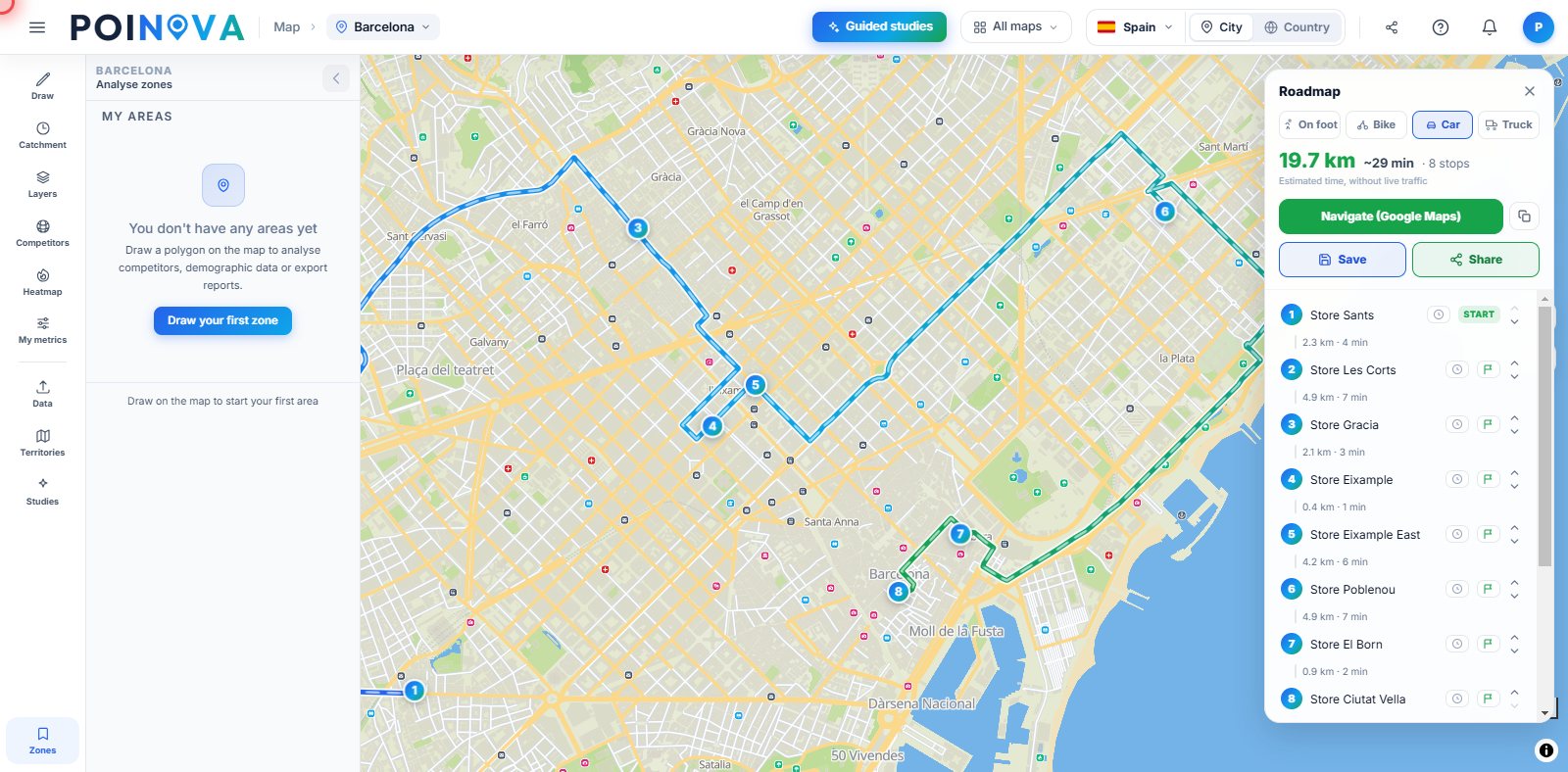
POINOVA map with a multi-stop delivery route in Barcelona
What it solves for you

Every minute of delivery costs money

These are the headaches of anyone running last-mile operations, and how POINOVA clears them out of the way.

Where should you place the next warehouse?

Compare candidate sites by the population they cover in 15, 20 or 30 minutes, and pick the one that reaches the most people in the shortest delivery time.

How many people can I reach in X minutes?

Real isochrones that follow streets, not circles: if a river or motorway cuts through the area, it shows. The real coverage, not the theoretical one.

Does my network cover the market well? Pro

Map your current hubs across the territory and spot areas that have demand but no reasonable coverage.

Use cases

This is how you organise your delivery network on the map

You move from intuition to decisions on the map: where to place the warehouse, how to split the zones and which route each van takes.

POINOVA map with a multi-stop delivery route in Barcelona

Shorter multi-stop routes Advanced

You upload the day's deliveries from an Excel or CSV file and POINOVA orders them into a multi-stop route over real streets. You see the route on the map and decide which stops to group so each van wastes less time between deliveries.

The warehouse in the right spot

You mark two or three candidate locations for your warehouse and calculate the 20- or 30-minute drive-time isochrone from each. You compare how much population each option covers and choose the spot that reaches more people in less delivery time.

Balanced delivery zones Pro

You divide the city into delivery zones and spread the load across couriers or hubs so none gets overloaded. You adjust the boundaries on the map until each zone has a similar delivery volume.

Logistics

Decide where to put your hub

Choose your warehouse location, split delivery zones and reach more people in less time.

Count your orders in each area Pro

Upload your orders or customers and see how many fall inside the area of each candidate warehouse. That way you compare by real demand, not just by population.

Split zones and routes Pro

Divide the area among hubs or drivers with balanced loads. On the Advanced plan, optimise the delivery routes too.

Demand heatmap Advanced

Upload your orders and see on a heatmap where they cluster, so you can place the hub close by.

Compare candidate sites Pro

Put several candidate warehouses side by side with the same yardstick and pick the best.

Frequently asked questions

Frequently asked questions about POINOVA for logistics and the last mile

How do I see how many people a warehouse reaches in 30 minutes?
You mark the warehouse on the map, choose driving, cycling or walking and the minutes, up to 60, and we draw the area along the streets. Then you see how many people live inside it, from official data. The free plan includes 2 isochrones a day.
Can I split the city into delivery zones?
Yes, on the Pro plan and above. You split an area by postcode or neighbourhood into zones balanced by population or by size, or you divide your delivery points by real driving time.
Can I plan delivery routes with many stops?
Yes, on the Advanced plan. You upload the day's deliveries from an Excel or CSV file and we sequence them into a route on real streets, by car or truck: up to 100 stops and, if you like, we split them across 2 to 8 drivers.
What can I do for free, and what needs the Pro plan?
Free: map with basic demographic data, population by area, country view by areas, drawing areas (2 isochrones a day) and up to 3 saved areas. On the Pro plan: NovaScore and 60+ indicators, competitors and points of interest, PDF and Excel reports, guided studies and territories.
Do I need technical skills or map know-how?
No. It's self-service and everything happens on the map: you mark a point, choose the minutes and see the area's data. You can start for free, with no card required.

See how many people your next warehouse reaches

Analyse a real candidate for your next warehouse or hub. No card needed.

Try for free

Included in the free plan: Map with basic demographic data · Population by area · Country view by areas · Draw areas (2 isochrones a day) · Up to 3 saved areas.
Not included (unlocks when you upgrade): NovaScore and 60+ indicators · Competitors and points of interest · PDF and Excel reports · Guided studies · Territories.
See plans
Logistics & last mileTry for free